

Original price was: EGP 167,894,881.31.EGP 158,492,767.96Current price is: EGP 158,492,767.96.
Original price was: EGP 70,853,596.69.EGP 66,885,795.27Current price is: EGP 66,885,795.27.
Original price was: EGP 23,393,745.34.EGP 22,083,695.60Current price is: EGP 22,083,695.60.
Original price was: EGP 19,951,162.50.EGP 18,833,897.40Current price is: EGP 18,833,897.40.
Original price was: EGP 15,947,932.50.EGP 15,054,848.28Current price is: EGP 15,054,848.28.
Original price was: EGP 14,374,715.10.EGP 13,569,731.05Current price is: EGP 13,569,731.05.
Egyptian pound (EGP) - EGP
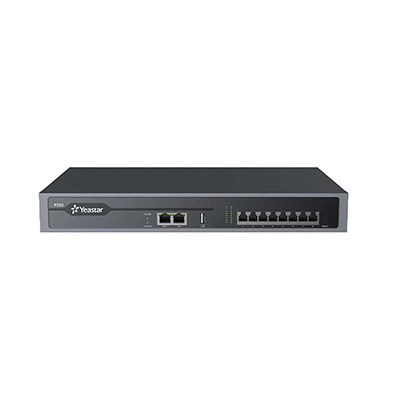
Yeastar IP PBX P550
In Stock
EGP 0.00
In Stock
The Yeastar P550 VoIP PBX is an adaptive, professional, reliable PBX phone system for SMEs. It alllows businessses to to have uninterruped communications in at …
Description
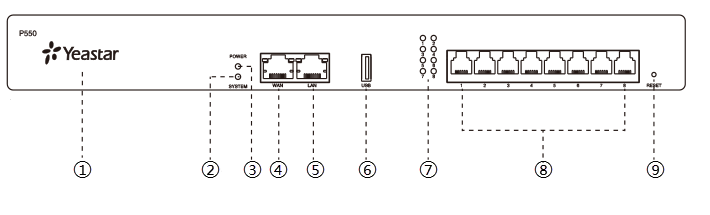
| No. | Indicator, Button or Interface | Description |
|---|---|---|
| ① | NFC Tag | Tap NFC-capable mobile phone’s back against Yeastar logo to quickly configure network settings. |
| ② | System Indicator | Indicate the system status.
|
| ③ | Power Indicator | Indicate the power status. |
| ④ | WAN Port | For connection to Wide Area Network (WAN). |
| ⑤ | LAN Port | For connection to Local Area Network (LAN). |
| ⑥ | USB Slot | Insert a USB flash drive to store voicemails, logs, or recording files. |
| ⑦ | 1-8 LED (RJ11 port status) | Indicate the ports’ status.
|
| ⑧ | 1-8 port (RJ11 ports) |
|
| ⑨ | Reset button | Press the button and hold for 10 seconds to restore to factory defaults. |
Rear panel
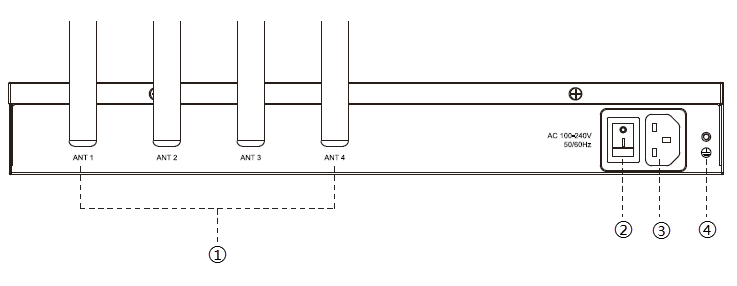
| No. | Button or Interface | Description |
|---|---|---|
| ① | Antenna Socket | Rotate the antenna into the Antenna Socket. |
| ② | Power Switch | Press this button to switch on/off the device. |
| ③ | Power Inlet | Connect the supplied power supply to the port. |
| ④ | Protective Earth | Connect to the ground to reduce the risk of electrocution to the user or protect the PBX from bad effects of external noise in case of a lightning strike. |



Reviews
There are no reviews yet.